Plugins are how agent platforms grow up
The idea started while we were building an enterprise MCP Gateway. The goal was practical: make internal MCP servers discoverable, easy to connect, governed, and secure. One front door for all the tool-calling capability that was starting to show up across the company.
When the gateway launched, the part end users noticed first was simple: approved MCP servers could show up automatically inside the AI tools they were already using. No scavenger hunt. No random Slack thread with an old config snippet. No guessing which server was safe to use. If a server was approved and you had access, it appeared.
That was the part that stuck with me. The hard problem was not only building the capability. It was getting the capability into people's hands without making them wire the whole thing together first.
The JSON problem
For technical users, adding an MCP server config to a JSON file sounds trivial. For everyone else, it is a wall. They have to find the right file, paste the right shape, install the right packages, restart the right client, and hope they did not miss a comma. That is not onboarding. That is a small hazing ritual with braces.
So I moved the experience away from raw config and toward an MCPB-style bundle for Claude Desktop: a package that carried the MCP server config and removed the need for users to install dependencies or hand edit local JSON. Add the MCPB-style bundle once, and the approved MCP server could show up in Claude Desktop for the right users. The idea was simple. If the capability is approved, package it like something a user can install, not like a puzzle they have to assemble.
That landed immediately. People who would never touch an MCP config could now add a capability with confidence. The gateway had made tools discoverable; bundling made them usable.
Then skills made the problem bigger
A couple of months later, skills started gaining traction. I began dabbling with them the way most useful internal platform ideas begin: selfishly. I built small skills for myself around Confluence and Jira. The instructions were not just "write a summary" or "make a ticket." They also told the agent which MCP servers we had already enabled and how those tools should be used.
Soon that pattern was everywhere in my own setup. A skill would teach the agent the workflow, and the MCP server would give it hands. The skill teaches the agent how to work. The MCP server gives it where to act.
The split got annoying fast. A sales skill that assumes sales tools still leaves someone wiring MCP somewhere else. Same for HR, support, finance, or any workflow where the instructions and the tools depend on each other. The package I wanted was boring: ship the instructions and tools together, keep review and RBAC on the package, and spare every user the wiring.
- 01 MCP Gateway approved tools show up where people already work
- 02 MCPB-style bundle config and dependencies become one install
- 03 Skills agent instructions become reusable know-how
- 04 Plugins tools, skills, and trust ship together
The argument never changed: stop making end users wire the platform together by hand.
The plugin I wanted was a package, not a list
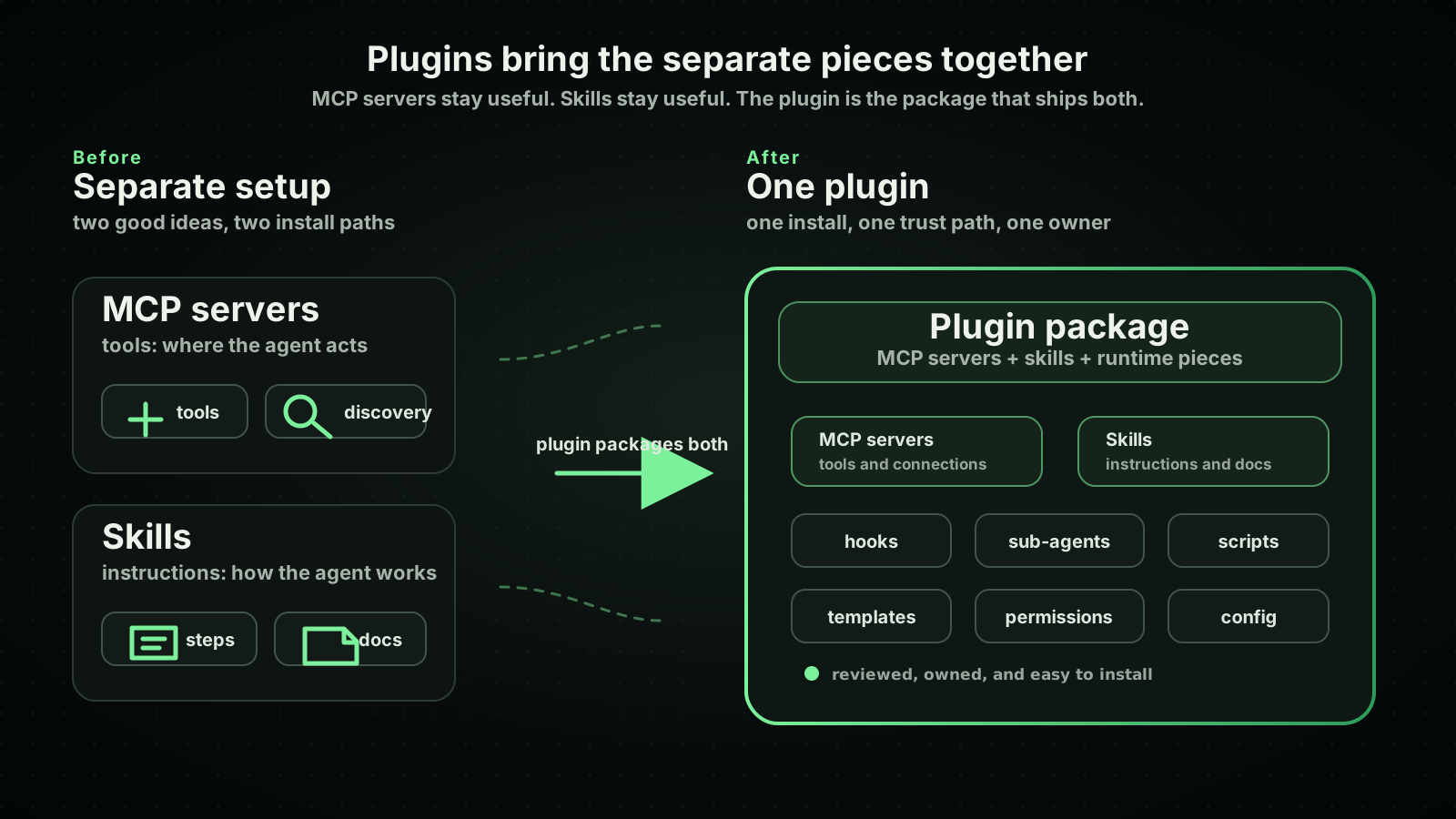
The plugin model clicked because it looked like the package I had been circling: skills and MCP servers traveling together. The skill teaches the agent how to work. The MCP server gives it where to act. The plugin lets them ship together.
Remote MCP support still matters, especially in enterprises where central services, SSO, audit, and rate limits are the right answer. But what clicked for me was the packaging boundary. An MCP server should feel as easy to add as an MCPB file, and a plugin should carry the skill that knows how to use it. That was the useful unit, not the prompt by itself and not the server by itself.
Codex made the shape obvious
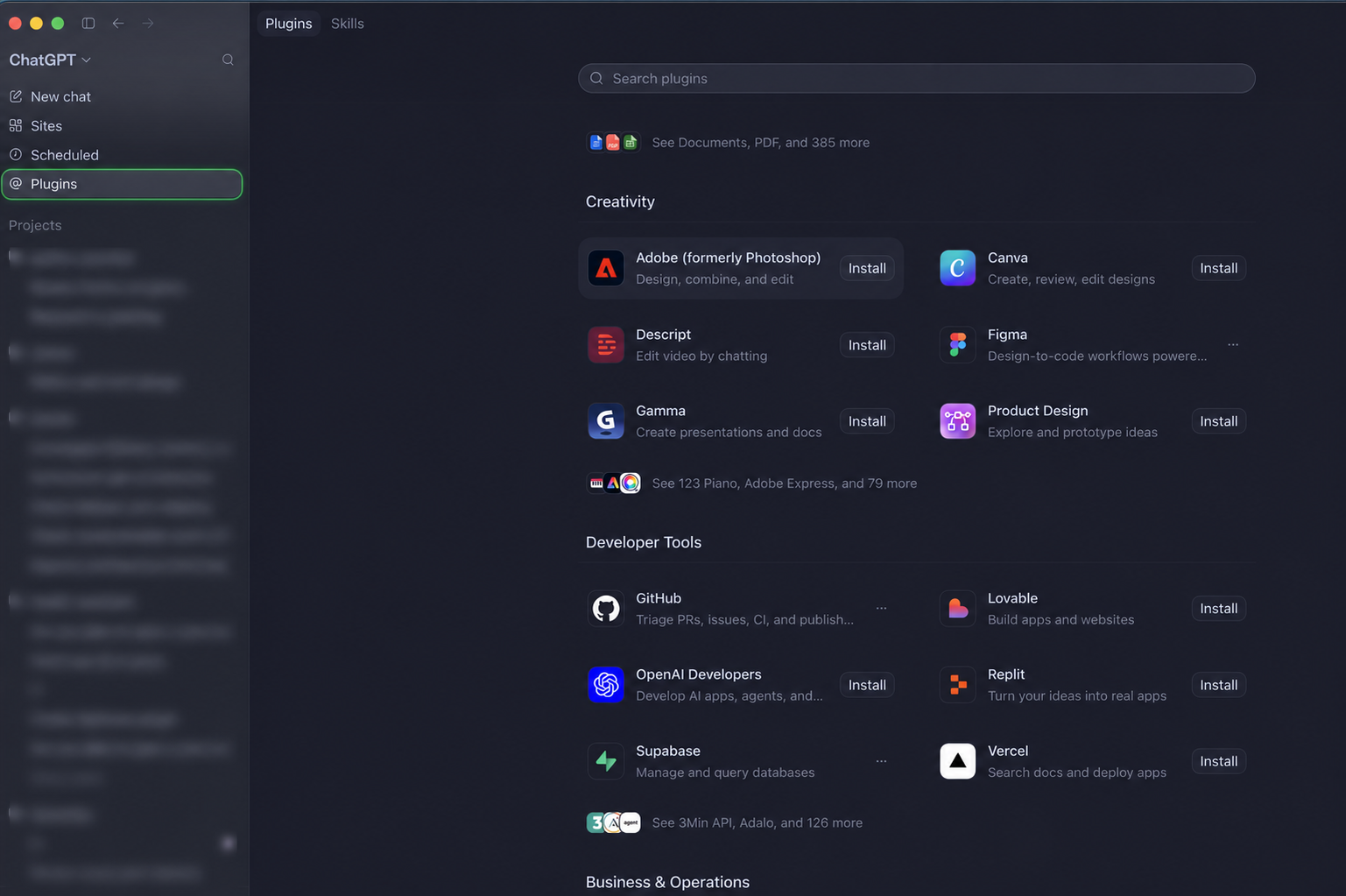
In my personal projects I use Codex heavily. I like the Codex app, and since it showed up I have basically been a Codex person. Claude Desktop and Codex both made the plugin shape feel obvious to me. In Codex, though, plugins are a first-class surface in the app, and that reminded me what the enterprise version should feel like: install once, stop thinking about the wiring.
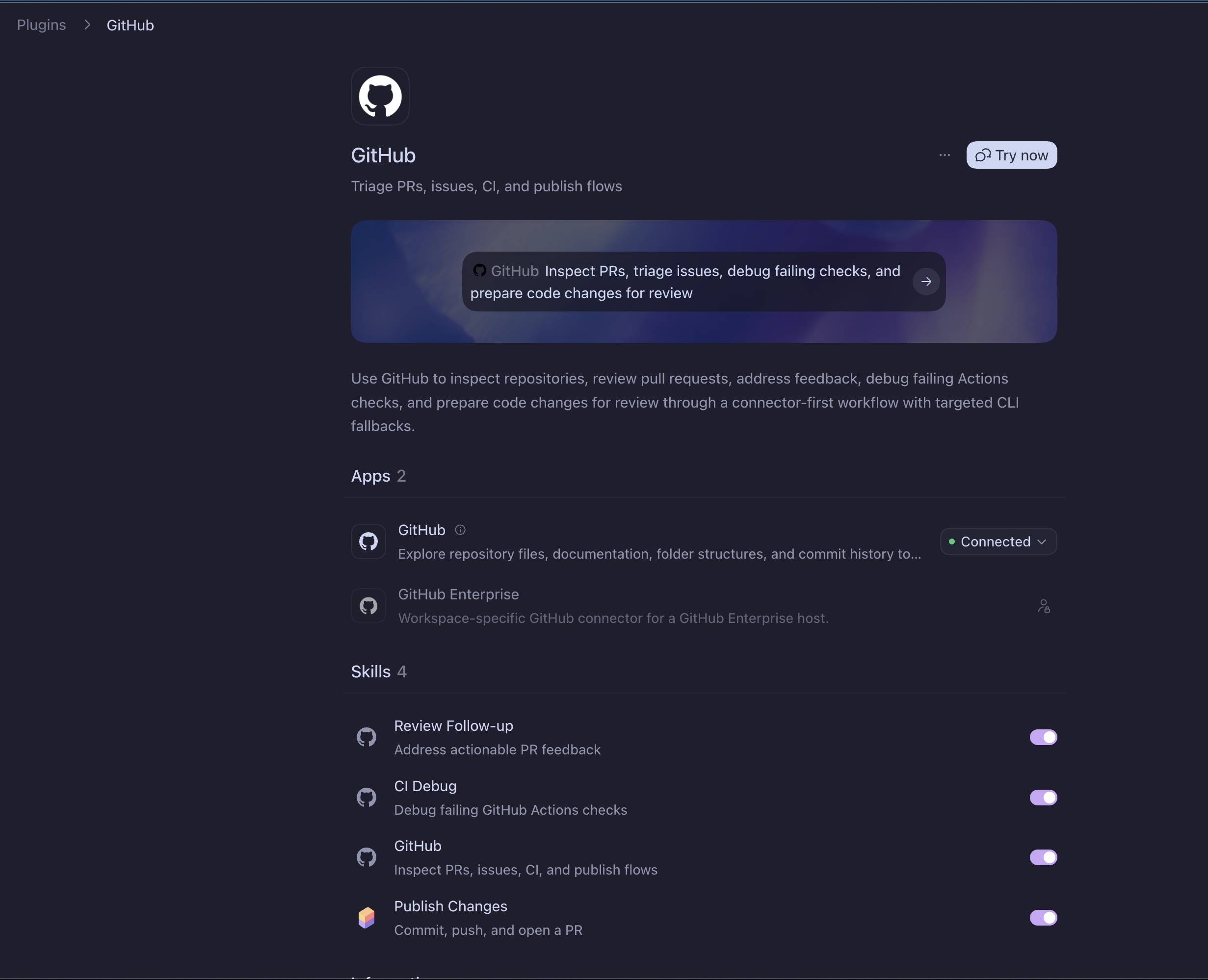
The GitHub plugin makes the packaging idea concrete. It is not just a listing page. It brings apps and skills into one place: the GitHub app gives Codex a connected way to inspect repositories, files, pull requests, and commit history, while the skills provide workflows like reviewing follow-up, debugging CI, using GitHub, and publishing changes.
The same pattern can apply whether the runtime piece is an app, a connector, an MCP server, or another plugin component. In chat, the user should be able to ask for the work directly: inspect this repo, triage PR feedback, debug a failing Actions check, or prepare a change for review. The plugin carries the connection and the working instructions together.
To be clear, I mean the packaging experience there, not the whole enterprise governance story. The registry I had in mind still needs the Claude Desktop-style control plane: assign a plugin or capability to a group, make it visible only to the people who should use it, and roll it out by team instead of sending everyone another setup guide.
You install a plugin. The skill is there. The MCP server is there. The app knows how to expose it. You are not separately hunting for a folder, a config block, a dependency list, and a restart sequence. The platform feels like a product instead of a pile of instructions.
That is the bar enterprise tooling has to meet. If agents are supposed to be for everyone, the install story cannot be written only for people who enjoy editing config files.
Why enterprises need registries
And for enterprise, the registry matters just as much as the package. My argument has stayed the same: if public agent tools can have first-party and third-party plugins, enterprises need the internal equivalent. A wiki goes stale in a week. If teams are going to share these packages, they need a place to publish them with owners, review, RBAC, and access rules.
I do not mean a central team writing every plugin. The useful version is owned by the teams closest to the work. One company might organize plugins by business unit: HR, Finance, Sales, Marketing, Support, Legal, Engineering. Another might organize them by function or domain: Observability, Developer Tools, Design, Data, Security, workflow, system, sensitivity, region, or compliance boundary. The shape matters less than the ownership model: the team that understands the work owns the capability, and the platform team provides the review pipeline, the policy layer, the security checks, and the RBAC model for sensitive plugins. Ownership stays visible instead of turning into folklore.
At first, this was not an easy sell. That is normal. New agent abstractions sound optional until people start building useful things with them. Then the question changes from "why would we need this?" to "how do we let people share these safely?"
My team is now on the way to launching a registry because the ask stopped being theoretical. Teams do not just want to build skills. They want to share them safely.
Cutting edge is usually just listening carefully
A lot of teams like to say they are on the cutting edge. The phrase is easy. The actual work is quieter. It starts when you sit with a small user problem long enough to respect it: why is this config hard for non-technical users, why does a skill have to explain which tools exist, why can't anyone share a powerful agent package without a trust path.
Sometimes someone outside has already solved it and you just need a better shape. Sometimes you're early and have to keep repeating the point until the system catches up. Either way, the job is the same: make the useful thing easier to adopt without making it less safe.
That is why I keep coming back to registries. Not because the word is exciting. Because without one, every useful agent capability turns into a private folder, a stale wiki page, or a config snippet someone else has to rediscover.
Does your company have an internal registry for this yet? If not, I'm curious how you're letting teams share skills and plugins without it turning into another wiki page nobody updates.